



A long time ago I described a fairly simple way to virtualize the projects I work on, so it's easy to switch between them and they don't get in each other's way. 7 years have passed and of course the approach has evolved. Back then, using separate containers started with docker run was faster and more convenient, so I didn't write Dockerfiles and docker-compose files. But progress did catch up with me on this one and won. Now I use docker compose for local development too.
Still, I try not to use tools with all sorts of presets like lando or ddev. Mostly because when I ran into them, they worked fine — until I needed to change something in them or do something non-standard. After that the brain-melting began, sometimes so bad that it was easier to rebuild everything myself right away. Besides, if you build "clean" environments, you have a chance to better understand how it all works, and if you use lando, forge, ddev and the like — the opposite.
So, why docker compose is better.
First, of course, all the settings are in plain sight, in files. That means you can hand the file to someone and they'll easily rebuild that environment on their machine. Files are clearer — you can always see what you're changing and where. Files can, after all, be pushed to git.
Second, maintainability. The individual images I used were wonderful in their own way — but only until it turned out that an image was built once upon a time on Debian 9 and now you need to install PHP 8.5 on it. Not that it's super hard, but it takes time and, even if you do it rarely, gets old to death. With the file-based approach, you just change the PHP and package versions in the settings, and it rebuilds itself.
Third, with the development of AI tools it became obvious that asking a neural colleague to work with docker-compose.yml and Dockerfile is much easier than asking it to write instructions for upgrading an old container from the console. And in general, Claude and friends are a great help in figuring things out when something about a docker environment is unclear.
And what was the old way better at to begin with?
First of all, it put each of my new dev containers on a separate IP. 172.17.0.2, 172.17.0.3 and so on. So the containers didn't conflict with each other, you just had to remember (at the moment) what was on which IP, and everything worked. Whereas with the new nginx containers with local domains, you want to access dev sites as, say, site1.local, site2.local, netspark.local and so on — and not memorize IP addresses anymore. But then the nginx instances of different projects start conflicting with each other and won't run in parallel.
And the desire to run several projects in parallel, again thanks to the development of neural networks, comes up more and more often: in one the machine is thinking about a task, in another — you are. In one you make an edit, in another the test suite takes 20 minutes to run. So for a while I combined the approaches. Old projects I traditionally ran on single handcrafted containers, and new ones I already set up on docker compose. Here's an example docker-compose.yml for a new Laravel project:
- nginx,
- PHP 8.3,
- MySQL,
- Redis for cache, queues and deduplication,
- Supervisor to keep horizon and reverb running,
- Horizon to manage queues,
- Reverb for websockets,
- Mailhog for catching test mail
- and self-signed certificates so it works over https.
services:
  app:
    build:
      context: .
      dockerfile: ./build/app/Dockerfile
    container_name: laravel_site
    restart: unless-stopped
    volumes:
      - .:/var/www/html
    environment:
      - DB_HOST=mysql
      - REDIS_HOST=redis
      - MAIL_HOST=mailhog
      - TZ=Europe/Moscow
      - MYSQL_DISABLE_SSL_VERIFY=true
      - REVERB_HOST=reverb
      - REVERB_PORT=8080
      - REVERB_SCHEME=http
    depends_on:
      - mysql
      - redis
      - mailhog
    networks:
      - laravel_site_network

  webserver:
    build:
      context: .
      dockerfile: ./build/nginx/Dockerfile.local
    container_name: laravel_site_nginx
    restart: unless-stopped
    ports:
      - "80:80"
      - "443:443"
    volumes:
      - .:/var/www/html
      - ./build/nginx/conf.d/app.local.conf:/etc/nginx/conf.d/app.conf:ro
    environment:
      - TZ=Europe/Moscow
    depends_on:
      - app
      - reverb
    networks:
      - laravel_site_network

  mysql:
    image: mysql:8.0
    container_name: laravel_site_mysql
    restart: unless-stopped
    command: --require_secure_transport=OFF
    environment:
      MYSQL_ROOT_PASSWORD: ${DB_PASSWORD}
      MYSQL_DATABASE: ${DB_DATABASE}
      TZ: Europe/Moscow
    volumes:
      - mysql_laravel_site_data:/var/lib/mysql
    ports:
      - "3306:3306"
    networks:
      - laravel_site_network

  redis:
    image: redis:alpine
    container_name: laravel_site_redis
    restart: unless-stopped
    environment:
      - TZ=Europe/Moscow
    networks:
      - laravel_site_network

  mailhog:
    image: mailhog/mailhog
    container_name: laravel_site_mailhog
    restart: unless-stopped
    ports:
      - "1025:1025"   # SMTP
      - "8025:8025"   # Web UI
    networks:
      - laravel_site_network

  reverb:
    build:
      context: .
      dockerfile: ./build/app/Dockerfile
    container_name: laravel_site_reverb
    restart: unless-stopped
    command: php /var/www/html/artisan reverb:start --host=0.0.0.0 --port=8080 --debug # so debug messages end up in the log
    environment:
      - DB_HOST=mysql
      - REDIS_HOST=redis
      - TZ=Europe/Moscow
      - REVERB_SERVER_HOST=0.0.0.0
      - REVERB_SERVER_PORT=8080
    volumes:
      - .:/var/www/html
    depends_on:
      - mysql
      - redis
    networks:
      - laravel_site_network

  supervisor:
    build:
      context: .
      dockerfile: ./build/app/Dockerfile
    container_name: laravel_site_supervisor
    restart: unless-stopped
    command: supervisord -n -c /etc/supervisor/supervisord.conf
    environment:
      - DB_HOST=mysql
      - REDIS_HOST=redis
      - TZ=Europe/Moscow
      - MYSQL_DISABLE_SSL_VERIFY=true
      - REVERB_HOST=reverb
      - REVERB_PORT=8080
      - REVERB_SCHEME=http
    volumes:
      - .:/var/www/html
      - ./build/supervisor:/etc/supervisor/conf.d
    depends_on:
      - app
      - mysql
      - redis
      - reverb
    networks:
      - laravel_site_network

  cron:
    build:
      context: .
      dockerfile: ./build/app/Dockerfile
    container_name: laravel_site_cron
    restart: unless-stopped
    command: cron-start
    volumes:
      - .:/var/www/html
    environment:
      - DB_HOST=mysql
      - REDIS_HOST=redis
      - TZ=Europe/Moscow
      - MYSQL_DISABLE_SSL_VERIFY=true
    depends_on:
      - app
      - mysql
      - redis
    networks:
      - laravel_site_network

volumes:
  mysql_laravel_site_data:

networks:
  laravel_site_network:
    driver: bridge
And here are the Dockerfile and nginx settings:
FROM php:8.3-fpm

RUN apt-get update && apt-get install -y \
    git \
    cron \
    curl \
    libcurl4-openssl-dev \
    libpng-dev \
    libzip-dev \
    libonig-dev \
    libxml2-dev \
    libssl-dev \
    unzip \
    supervisor \
    mariadb-client \
    zlib1g-dev

RUN pecl install -o -f redis \
    && rm -rf /tmp/pear \
    && docker-php-ext-enable redis

RUN docker-php-ext-configure zip --with-zip \
    && docker-php-ext-install -j$(nproc) \
    pdo_mysql \
    pcntl \
    zip \
    gd \
    bcmath \
    curl \
    mbstring

RUN docker-php-ext-enable opcache

# Custom PHP settings
COPY ./build/app/php-local.ini /usr/local/etc/php/conf.d/php-local.ini

COPY --from=composer:latest /usr/bin/composer /usr/bin/composer

# Copy crontab
COPY ./build/app/entrypoints/cron-start.sh /usr/local/bin/cron-start
RUN chmod +x /usr/local/bin/cron-start

# Entrypoint for the app container: storage permissions + start php-fpm
COPY ./build/app/entrypoints/app-start.sh /usr/local/bin/app-start
RUN chmod +x /usr/local/bin/app-start

WORKDIR /var/www/html

CMD ["app-start"]
You can put partial overrides of PHP parameters, such as memory_limit or max_upload_size, into /build/php-local.ini.
The /build/nginx/conf.d/app.local.conf config:
server {
    listen 80;
    server_name laravel_site.local;
    return 301 https://$host$request_uri;
}

server {
    listen 443 ssl default_server;

    server_name laravel_site.local;

    ssl_certificate     /etc/ssl/local/cert.pem;
    ssl_certificate_key /etc/ssl/local/key.pem;

    root /var/www/html/public;

    add_header X-Frame-Options "SAMEORIGIN";
    add_header X-Content-Type-Options "nosniff";

    index index.php;
    charset utf-8;

    # WebSocket proxy for Laravel Reverb (/app/{key} — pusher protocol)
    location /app/ {
        proxy_pass http://reverb:8080;
        proxy_http_version 1.1;
        proxy_set_header Upgrade $http_upgrade;
        proxy_set_header Connection "Upgrade";
        proxy_set_header Host $host;
        proxy_set_header X-Real-IP $remote_addr;
        proxy_set_header X-Forwarded-For $proxy_add_x_forwarded_for;
        proxy_set_header X-Forwarded-Proto $scheme;
        proxy_read_timeout 60s;
    }

    location / {
        try_files $uri $uri/ /index.php?$query_string;
    }

    location = /favicon.ico { access_log off; log_not_found off; }
    location = /robots.txt  { access_log off; log_not_found off; }

    error_page 404 /index.php;

    location ~ \.php$ {
        fastcgi_pass app:9000;
        fastcgi_param SCRIPT_FILENAME $document_root$fastcgi_script_name;
        include fastcgi_params;
        fastcgi_hide_header X-Powered-By;
    }

    location ~ /\.(?!well-known).* {
        deny all;
    }
}
/build/nginx/Dockerfile.local to generate self-signed certificates (runs when the container starts):
FROM nginx:alpine

RUN apk add --no-cache openssl && \
    mkdir -p /etc/ssl/local && \
    openssl req -x509 -nodes -days 3650 -newkey rsa:2048 \
      -keyout /etc/ssl/local/key.pem \
      -out /etc/ssl/local/cert.pem \
      -subj "/C=RU/ST=Local/L=Local/O=Dev/CN=laravel_site.local"
and here's /build/entrypoints/app-start.sh
#!/bin/bash
set -e

chown -R www-data:www-data /var/www/html/storage /var/www/html/bootstrap/cache
chmod -R 775 /var/www/html/storage /var/www/html/bootstrap/cache

exec php-fpm
But the problem is that two projects with this configuration won't start at the same time: the first one's nginx will pull the blanket over to itself and won't let the second one work. Of course, you could move nginx out of the individual projects and make a shared config for all of them. But at first glance that looks too ad hoc and intuitively I don't want to do it. I want some kind of plug'n'play, so that for the next project I can write a docker-compose.yml following certain rules, and it would take its place next to the others by itself. So I gathered my thoughts and set up for these local projects
One shared traefik container.
traefik acts as a reverse proxy. It starts up and distributes incoming traffic among the running local containers. What's more, adding new projects doesn't require changes to the traefik config, it's enough to specify certain labels in the project's docker-compose.yml. And add the local domain to /etc/hosts so it resolves.
docker-compose.yml for traefik:
services:
  traefik:
    image: traefik:v3
    container_name: traefik
    restart: unless-stopped
    command:
      - --api.insecure=true
      - --providers.docker=true
      - --providers.docker.exposedbydefault=false
      - --providers.docker.network=traefik_proxy
      - --entrypoints.web.address=:80
      - --entrypoints.websecure.address=:443
      # Global HTTP → HTTPS redirect
      - --entrypoints.web.http.redirections.entrypoint.to=websecure
      - --entrypoints.web.http.redirections.entrypoint.scheme=https
      # Ignore self-signed certificates on backends
      - --serversTransport.insecureSkipVerify=true
    ports:
      - "80:80"
      - "443:443"
      - "8080:8080"   # Traefik dashboard
    volumes:
      - /var/run/docker.sock:/var/run/docker.sock:ro
    networks:
      - traefik_proxy

networks:
  traefik_proxy:
    external: true
a script to start the network and the traefik container with a single command:
#!/usr/bin/env bash
set -e

docker network create traefik_proxy 2>/dev/null || echo "Network traefik_proxy already exists"
docker compose up -d
echo "Traefik is running. Dashboard: http://localhost:8080"
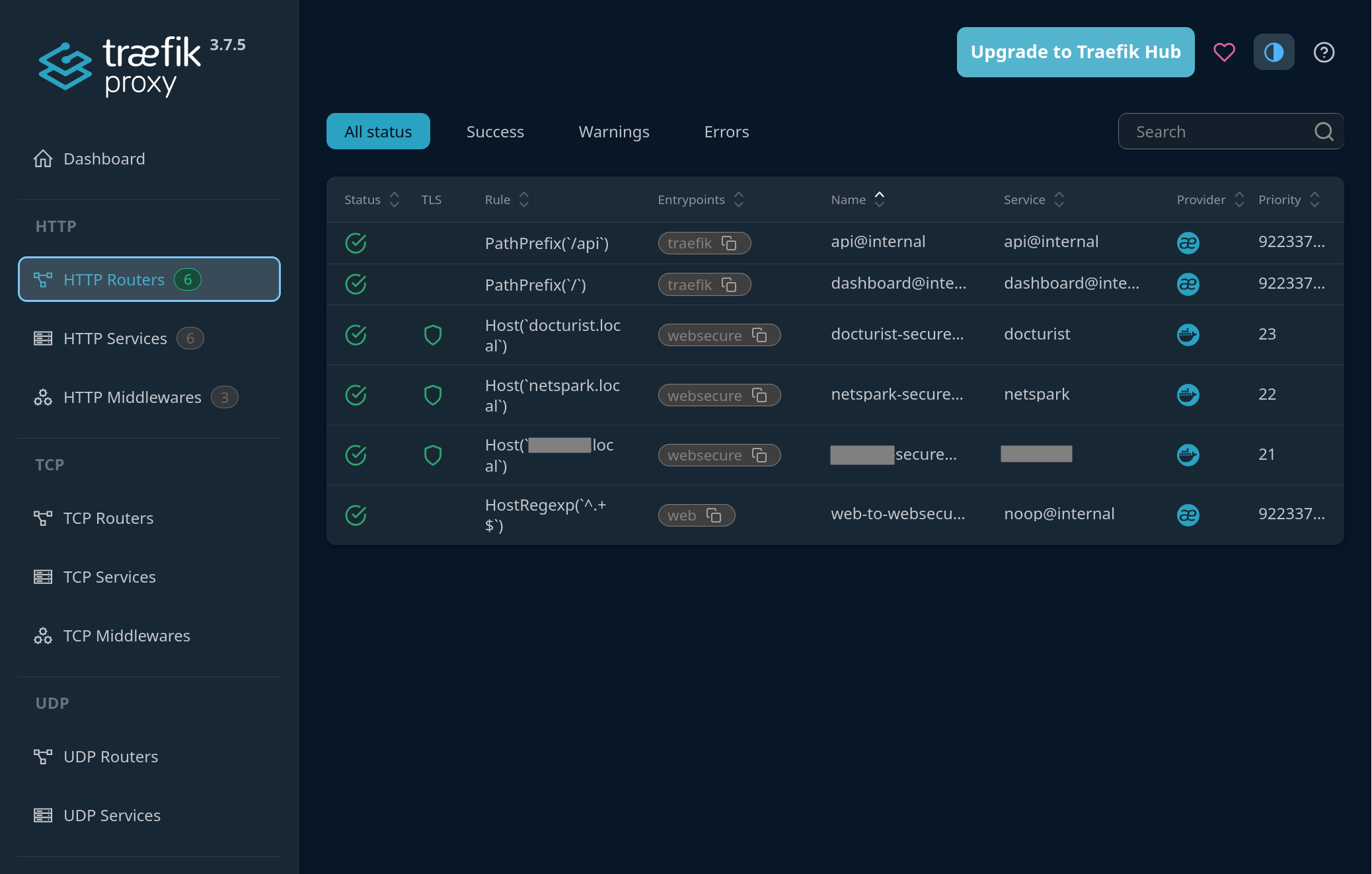
A neat piece of software, and I've already run into it in production too, where fifty projects run on a host in their own containers, several per project, and traefik proxies them to the outside world. It even has its own neat little web panel, you can see it in the screenshot at the top.
The changes needed in the project's docker-compose.yml I showed above are minimal:
# the expose section replaces ports in webserver
expose:
     - "443"
# add the traefik_proxy network and labels for traefik
networks:
      - laravel_site_network
      - traefik_proxy
    labels:
      - "traefik.enable=true"
      - "traefik.http.routers.laravel_site-secure.rule=Host(`laravel_site.local`)"
      - "traefik.http.routers.laravel_site-secure.entrypoints=websecure"
      - "traefik.http.routers.laravel_site-secure.tls=true"
      - "traefik.http.services.laravel_site.loadbalancer.server.port=443"
      - "traefik.http.services.laravel_site.loadbalancer.server.scheme=https"
      - "traefik.docker.network=traefik_proxy"
Now I can bring some projects up with docker compose up -d, shut others down with docker compose down, and traefik automatically sees the routes and distributes requests. And the flexibility to reconfigure a project is preserved: you can reconfigure it, add containers to it, and so on.
Life has become a little more convenient.