



A year ago, in January, Drupal 7 finally reached its end of life. However, requests to upgrade from "seven" to the current version still keep coming in. As do requests to update Drupal in general. Hence a short primer on how we update Drupal and
Why update anything at all
There are three main reasons to update Drupal, like any other CMS, like software in general:
- New functionality. The developers added something and released updates. We updated and got new goodies.
- Bug fixes — as everyone knows, there's no software without bugs. The developers found a bug, fixed it and released an update. We updated and got more stable software.
- Security updates. Vulnerabilities, that is, potential entry points for an attack, are regularly found in software that can be accessed over the Internet. Vulnerabilities vary: some let you see information with restricted access, others let you set up stealing a user's password, others still let you take full control of the program or even of the whole server.
And while you can basically live without points 1 and 2, you shouldn't neglect security updates. The thing is, sites get hacked not only in the movies, and not only big or famous ones. Over time, scanners and exploits get written for the vulnerabilities found in software — programs that automatically find sites with unpatched vulnerabilities and automatically hack them, too. And all an attacker has to do is run such a program, and there they are with access to your server.
If you think your site is too small to interest hackers, that may well be true. But hacking it automatically to run a cryptocurrency miner or a spam mailer on the server, or simply to redirect traffic to some shady resources — your site will do just fine for that. Along with a hundred others just like it, found automatically. Here's an old case (in Russian), for example.
Regular updates
Now that we've figured out why to update, on to the question of how.
Drupal has great infrastructure and a well-run security team that tirelessly finds and fixes vulnerabilities in the system. Their updates (when there are any) come out on Wednesday evenings, so the best time to update is Thursday morning. For some clients we install updates once a week, for others once every two weeks or once a month. The longer the interval, the more updates come out during it, and the longer a single update takes.
Besides security patches, the system core and additionally installed modules get updated too. Updates can contain bug fixes as well as new features. A successful weekly update of an average site usually takes from 15 minutes to an hour, and a monthly one takes 2–3 hours (4–5 with a dedicated QA engineer and smoke tests). We look through the list of changes, do the technical part, then check the updated functionality to make sure nothing broke. Usually nothing does.
Technically, the operation is simple:
- Run the command that checks for and installs updates (composer update).
- Run database migrations (if the update has any).
- All the necessary checks.
- Export the configuration and commit the changes.
- Deploy (install) the updates to the live server according to our deployment rules.
These are all ordinary, everyday minor version updates (for example, from 10.4 to 10.5). It's recommended not to neglect them, or at least, I'll say it again, to install security patches. This will not only keep your Drupal site in good spirits, but will also make it easier to start
Major version upgrades (8 → 9 → 10 → 11)
This is where things get a bit more complicated. Between major versions there are backward-incompatible changes. Old APIs are removed, new ones appear, various rules for writing code change. So a simple composer update won't do here, you need to prepare. But there's good news too: most of the preparation can be sped up with the Upgrade Status module. It automatically checks the installed CMS modules, scans custom code (written by us) and reports whether everything is compatible and what's missing to make it compatible, in a report like this:
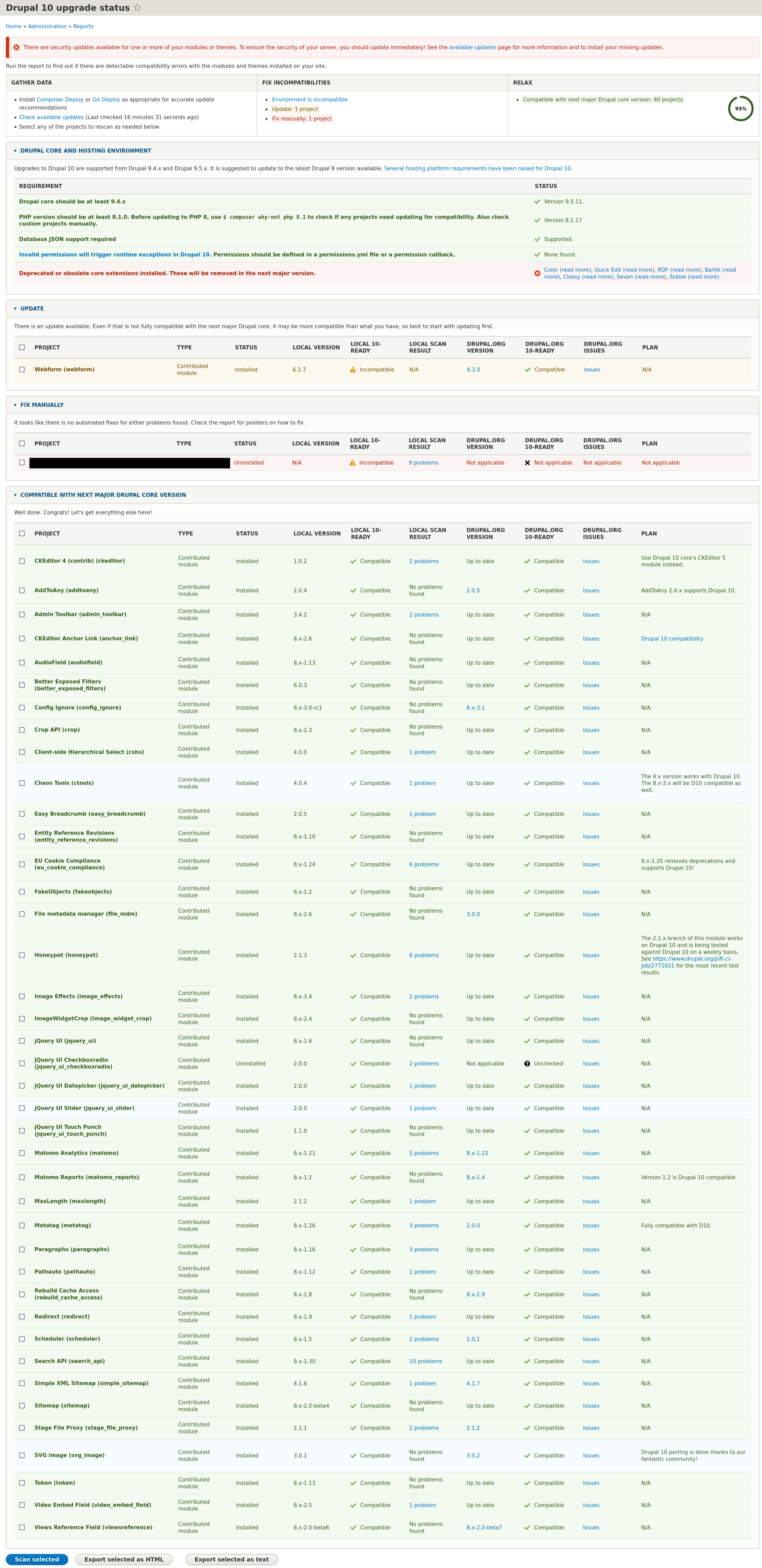
Based on the results, you need to pay attention to the points highlighted in the report: visit the pages of modules marked as incompatible (a compatible version may be available there) and fix the problems found in the code. Then find the page on drupal.org listing the changes between the given versions and go through your code, checking it against the list. Because the module doesn't highlight everything that needs to be done. For example, it doesn't flag the mandatory accessCheck() calls or the need to replace jQuery.once() with core/once.
At the same time, it's usually not worth upgrading to a major Drupal version as soon as it comes out: contributed modules simply won't be ready yet. You need to let the version mature at least until *.2. Right now the latest version is 11.3, so you can already prepare 10 → 11 upgrades.
Including all the preparation, depending on the complexity of the site being upgraded, a major Drupal version upgrade has taken us anywhere from 3–4 hours to 30–40. But that's with versions 8, 9, 10. So how do you do an
Upgrade from old versions (5, 6, 7) to the current one
The correct answer: you don't. You can't press some button and turn Drupal 7 into Drupal 10 (or 8). You can't run composer update: Drupal only started using Composer with version 8. And in general, the following fundamental changes happened between Drupal 7 and 8 (broadly speaking):
- The Drupal 8 core runs on the Symfony framework (and 7 doesn't). This means all custom code (written by us) has to be rewritten.
- Content and its structure are declared and stored differently, so it has to be recreated from scratch.
- The theme (the frontend) now runs on Twig instead of PHPTemplate. So all the templates need to be rewritten in Twig. Remove any PHP code inserts from them, if there are any. Move them, for example, into preprocess hooks.
In short, there's nothing to upgrade here. Essentially, you need to create a new site on the current version of Drupal and move the old content to it. Roughly like this:
- Install the necessary modules or their equivalents.
- Recreate the content types and taxonomy vocabularies.
- Build the necessary views, tables, feeds.
- Set up SEO modules and structured data.
- Move the styles and rewrite the templates from phptemplate to Twig, thus porting the theme.
- Rewrite your own modules to support the new APIs.
- Then, with a script or a module like Feeds, export the content from the old site.
- And, also with a script or a module, or via the Migrate API, import the content into the new site.
So in terms of effort it's roughly like building a new site, though not quite from scratch. So when you decide to upgrade from Drupal 7, it's a good occasion to think about what you don't like in the current version, what to remove, what to add, what to rethink. To evaluate whether a redesign is possible and needed. And to make the site better than before.
Get in touch if you need anything, we'll help!